We are all one click away from being pulled into an information portal, filled with erroneous, distracting and at times dangerous material. We are also one click away from making a mistakenly sharing information not intended for a wider audience, in the form of an email, a wall post, text or chat message. We've all heard the admonition "think before you post." The new mantra should be "think before you click." It's hard to stay true to this statement in practice, especially as we endure a fast-paced, real-time information onslaught.
Don't Fool Yourself every Search Engine has a different Safe Search button hidden within their search engine or app browser.
Google Safe Search for Images
This can be found on iOS
Here's how Google describes the new settings: "In the SafeSearch Filtering section, click the checkbox to filter sexually explicit video and images from Google Search result pages, as well as results that might link to explicit content. If you choose to leave it unchecked, we will provide the most relevant results for your query and may serve explicit content when you search for it." So Google may show explicit images, but only if it's obvious that you're searching for it. No algorithm is perfect, so you'll probably find many examples when this doesn't work as intended.
YouTube Safe Search for iOS
Here are a few tips to help parents control the content that their child views on YouTube, and on the web, in general.
Filtering on OS X
The quickest and easiest way to make YouTube kid-friendly is to enable Safety Mode. Safety Mode will screen out potentially objectionable content, so children can view YouTube in a web browser without unsavory videos and vulgar comments floating to the top. You can turn on Safety Mode by scrolling to the bottom of any YouTube page and clicking the drop-down menu in the "Safety" section. If you are logged into your YouTube account, you can lock this feature so it is always enabled. If you have multiple browsers, you have to open each browser and repeat this process to make sure Safety Mode is turned on in each one.
Yahoo Safe Search for iOS
To turn SafeSearch on or off scroll down to the bottom of the page. In the lower right hand corner tap the option to turn SafeSearch on or off. Depending on your current setting it will say either, "On/ Turn Off" or "Off/ Turn On."
NOTE: By default SafeSearch will be turned on. If you turn SafeSearch off you will need to agree that you are okay with potentially viewing mature content in the search results.
Where has the time gone? Over this summer our District was busy preparing for our 1:1 rollout. To give you an idea it was like riding a roller coaster and the thrill of the ride is still under way.
But how did we get to where we are right now? With volunteers and many hours over this past summer.
If you can imagine each device came individual wrapped. So as they say 1 by 1 we unloaded the trailer with all the digital devices for the students.
Next, came how do we assign all these device. Students volunteered their time to assist with inventorying, checking devices out to students, and putting cases on the iPads. So on the night of rollout things would be running smoothly. It was a process but we are greatly appreciative the time that was spent so that rollout ran smooth and students didn't have to stand in line waiting for us to check them out a device in our inventory system.
Seriously even though this process was done, and believe me it was a load off our shoulders our work was still not done. We still needed to transfer over our faculty to new device too! Yep we had it done just in time for there Apple PD. We did 10 new computer transfers a day in order to make our deadline.
Apple professional came into our District for 2 days of training to work with our staff. The first day they explored options of iLife. Within the iLife they learned how to integrate iMovie, GarageBand, and iPhoto into the classroom. The second day training revolved around Challenged-Based training on the teaching and learning that encourages students to leverage the technology they use in their daily lives to solve real-world problems. Both days for the Apple PD there were differentiated instructions for our staff to learn within their groups, and staff were creating, and exploring and asking questions on how to connect with the trainers for more exuberant ideas. Check out one teachers reflection from the 2 day training.
Here is a project a group created on Challenged-Based Learning:
Drumroll: It was rollout Night!
This was just the HS school laptops in which we had prepared ready to go.
Mr. Carver addresses the students about the exciting times ahead for the students.
Local Business and School Board members assisted with handing out the devices to the students.
Today was Crestwood High School fifty-second commencement ceremony but it was like no other to say the least. For those family members and friends who were unable to attend Spring Commencement, the Howard-Winneshiek Community School District was pleased to offer a live video stream of the ceremony. This was made possible with the partnership of JDL Horizons out of Minneapolis who assisted with providing us the set-up and equipment to make this all possible.
Camera 1 with Sound Board
I'll be honest I had butterflies in my stomach because with technology anything is possible and knowing we were going to be reaching a wide audience from all over the world.
Camera 2 with Video Mixer
We're "LIVE"
Yes! Its always a great feeling to see posts that we are "LIVE" and everything is clear all the way in Wales.
Presentation of Diplomas
To manage the cameras and soundboard today we utilized CHS students who showed an interest into the media production. Today I have heard our live video stream reached TX, CA, MN, IA, and Wales. Memories that will be cherished for a lifetime.
Create a compelling vision, one that takes people to a new place, and then translate that vision into a reality. ~Warren G. Bennis
Next school year, all students will be immersed in a technology rich environment, which motivates, engages students to learn 21st century skills, as it will be an integral part or our daily life. Sparked by our School Boards vision the recommendation to launch was reached with careful consideration by a School Board Member, administrator, staff members, and students. After a unanimous vote in favor of our 1:World learning initiative on May8th, 2013. For the K-6th grades the students will be issued an iPad and 7th-12th grade students will be issued a MacBook Air.
Why the 1:World Digital Learning Initiative
Our Districts mission is to prepare and empower our students to think creatively, serve, contribute and
succeed locally and globally. What is really important about this though is its not an initiative, its a 1:World digital learning initiative. This is not about the technology; it's about changing instruction in order to meet the needs of our students and to individualize instruction. As we launch this 1:World digital learning initiative with technology as a tool which will enhance learning and allow students to grow into 21st century learners.
This year our teachers have been stepping into the path of making global connection both near and far. From utilizing tools such as back channeling, Skype, ooVoo, and collaborating through google docs. Check out our 2012-2013 school year photo slide show that encompasses all the activities.
Connecting with schools in CT
The strengths to come with our 1:World digital learning initiative will be the transformation of the classrooms from a passive learning environment (teacher lectures) to an active learning environment (student-centered). This will allow for the students to become more engaged in the classroom activities. There are many different ways information can be presented by teacher and student, which allows for the expression of creativity.
Professional development and faculty preparation is crucial to achieving the 1:World learning initiative We have outstanding teacher's and staff; their professionalism, and passion for learning is the reason we can execute this project. To help staff take these talents to the next level, they will participate in professional development sessions in the fall of 2013 and throughout the school year.
This summary just touches a few key project elements. New policies must be written, laptops evaluated, infrastructure prepared, and communication plans drawn out. Our journey will be profound. Stay tuned to read about our 1:World learning initiative unfold which empowers students to succeed.
This past Saturday, the Howard-Winneshiek Community School District hosted the first edcamp, unique and participant-driven development for educators. The event, brought together over 60 educators from Minnesota, Iowa, and Wisconsin.
Edcamps are really more of a movement than anything, an acknowledgement that we as educators have so much we can learn from each other. The "unconference" format forgoes pre-set agendas, structured proposals, in favor of informal sessions run by people who are passionate about education and collaboration. Each session looks more like a conversation than an "info dump," and the process of sharing experiences, ideas and resources is just well inspiring. You can see the schedule that was formed here.
Here are a few snapshots:
This session discussed about Digital Lesson planning. Educators collaborating about the 21st Century learning skills for students. There discussion lead to the utilization of different Web 2.0 tools Edmodo, Schoology, Google Docs, etc. within the classroom.
Howard-Winneshiek Superintendent John Carver provides a session on how to expand your Personal Learning Network for educators. Wow, talk about exciting John is Skyping in Jerry Blumengarten @cybraryman1 for the session.
Shannon Miller from VanMeter joined #edcamphwinn for the morning sessions sharing her wealth and knowledge with integrating technology into the classroom. Shannon shared with educators how to organize bookmarks with Symbaloo within there classroom to assist students for finding resources. Check out the poetry Symbaloo for poetry in your pocket month.
It's always wonderful to hear back from edcamper's about there experience from attending an edcamp. Here are a few blogs to check out Coffee with Cloe and AnIowaTeacher. Over the course of the day there were plenty of resources and excellent resources tweeted out so if you missed something check out the Storify from the twitter feed for the day.
Our new mission which was adopted earlier this year states: to prepare and empower our students to think creatively, serve, contribute and succeed locally and globally.
The question that people wonder is how are me making our connections? Connections are being formed through twitter accounts, edmodo global connections, news and Skype in the classroom.
When utilizing Skype in the Classroom, its a free and easy way for teachers to open up there classroom and create an amazing learning experience for their students. Recently Skype in the Classroom has know made it available for teachers to apply for free video group calling.
Our District is always looking for global connections to empower our students for the 21st Century Learning. Let us know if you would like to connect your classroom globally and follow us on twitter #2020howardwinn, or #cadetnation to see our global connections we are making each and everyday.
Gov. Terry Branstad
On March 6th, was World Read Aloud and our District celebrated by Skyping different authors to listen to them read.
Janet Stevens
Janet Stevens has written and/or illustrated more than 30 picture books and several with her sister Susan. She read the book called Tops and Bottoms, which has received a Caldecott Honor Award, as well as the first Bill Martin Jr. Picture Book Award. Janet did her book reading from Vegas while she was on vacation so it an honor for our students to listen to her read on WRAD.
Mrs. P
Mrs. P an award-winning Free interactive digital storybook destination, which stars TV actress Kathy Kinney. Mrs. P also reads a story on her youtube channel so don't miss out on catching some of her new digital readings.
Not only did we have connections with celebrity readers with our District we also had connections across our Centers.
5th Graders along with CT WRAD
There was also connections from LimeSprings and Cresco 1st Grade classrooms too.
To Wrap-up the Week Up
We are making the news, yes as you can tell by the look of this picture its 5:50 am. This is huge for students to arrive this early in the morning to show there Cadet Pride. With the news crew and Nikki Newbrough from KWWL for School Spirit. Check out our morning news slots posted on School Spirt at KWWL.
A colleague asked me this week what I was studying within my Masters Program, so I explained TPACK? TPACK is a framework for YOU, and is designed to aide the integration of technology into teaching and learning. Based on Shulman's theory of Pedagogical Content Knowledge (PCK), this new framework also draws on recent research into teacher's influences of the current technology climate within the classroom (reference available here).
Pedagogy, Content, and Technology are recognized as individually important concepts, in which teachers must be competent in order to teach effectively. The overlaps between teacher area are also important, with the area in the middle of the diagram (where all three knowledges overlap) being the desired outcome for educators through the TPACK framework.
Take a look at this TPACK video by Royace Kimmons using a 3- circle venn diagrams to explain the relationship of each domain.
Mark Fijor, a professional development instructor in the Arlington Heights, Illinois school district, created a rich and thoughtful set of blog posts that explain how his district is using TPACK-based ideas and practices district-wide in professional development efforts. In his first post, he explains: our district has done a phenomenal job of providing teachers and students with access to technology. In addition, his teachers are exposed to a wide variety of tools through in-services and conferences outside of the district. However, with this access and knowledge comes the idea of overexposure. Teachers are finding there are many different tools available for a task, and because of this, many are unsure of which is the best tool. Teachers are free to explore on their own and use a variety of tools, but this is limited to those who are truly interested about learning on their own and experimenting. When these tools are shared with staff, many of the teachers are left to wonder how the tools apply to what they are doing in the classroom, or are overwhelmed by the amount of resources available. It is from these dilemmas that Mark Fijor developed a framework and a series of guidelines that address the idea of systemic technology integration. In professional development with his teachers and administrators from various districts and experience levels, he believes the following series of post will address many of the concerns and problems with technology integration in schools.
Take a look at how Mark Fijor implemented the TPACK model to his staff during a series of Professional Development:
Keeping up with technology in the business offices, classrooms, and all points in between can improve the schools operations.
For example, once you wake up, what is the first device you grab? For instance you might reach for your cellphone, iPad, or laptop to find out what has happened while you were sleeping. You might commute to work in a vehicle with global-positioning systems to show you the best route; we wait for green lights that are programmed to help traffic move with the greatest efficiency; and we are careful not to run a red ligt out because the surveillance camera hovering above the intersection will capture our indiscretion. Even before we stumble out of our beds for the day, technology is intertwined in our lives.
So how can we keep up with Technology? Managing your reading and rss feeds
Zite is an awesome mobile app for educators. It “gives you personalized news, articles, blogs, videos and other content from a variety of both mainstream publications and sites”. Zite attempts to customize and deliver the type of articles you like to read in a newspaper style reading. It's Wifi-Connection or 4G enabled which means that you can easily access news content with a tap of a button.
Here is a short video tutorial to help you understand how to use Zite on your iPad
Feedly is a cool mobile app. It allows its users to get the latest updates of their favorite blogs and websites right into their iPhone, Droid devices, and iPads. If you are already an existing Google Reader user then this is your ”faster and more visual overlay with lots for sharing options and seamless 2-way integration”. For me i look at Feedly as a learning app and stay up-to-date on blogs, and websites instead of bookmarking them in a browser.
Here is a short video tutorial to help you understand how to use Feedly on your iPad
There are so many rss feeders to assist you on the go for reading your different blogs and websites, you just need to find the right combination for your needs. So here are some more to check into and see if they fit what you might be looking for; Flipboard, NewsSquares, NewsMix, and Newsify
Managing all those Tweets
If you feel overwhelmed with all of your tweets, check out tweetdeck. Tweetdeck can be accessed from Mac App Store or adding it as a Chrome extension. Similar to tweetdeck is Hootsuite. Its up to you to find the option that works for you as an educator. There are so many hashtags to follow: #2020howardwinn, #edcamphwinn, #iaedchat, #iPadchat and many more to explore. If you would like to explore more about what the @ or # meaning check out our website twitter for teachers.
Maximizing your time for locating Apps Time is always of the essence so when it comes to looking for an app its always great to find it in the palm of your hand. Check out these apps and hopefully they will save you valuable time for lesson plan ideas.
TechChef4u app offers multiple resources to support teachers and parents in their search for FREE quality apps for students. While the TechChef4U app is an educational app store that provides searchable and categorized lists of FREE apps for Pre-K-12, the app doesn't stop there. Check it out!
The TeacherCast app includes great App Reviews, Podcasts, Blogs, and Screencasts as well as links to their Twitter, FaceBook, and Daily Newspaper. This is the easiest and reliable one stop shop for all educational needs.
Last but not forgotten is the AppShopper. With out the AppShopper it would be hard to figure out what app happened to become FREE for a limited time frame.
What app or applications do you use to stay organized or up-to-date with the latest technology?
Before you start registering domain names or searching the web for graphics, take some time to think about the purpose of your blog. Is it going to be a blog where you share your daily adventures? Is it going to be a showcase for your classroom projects? There is no “wrong” purpose, but each purpose can influence how you go about setting up your blog. By knowing your starting point of your blog to accomplish in the beginning, you can then determine how and where you will begin. It is okay to change direction once your blog gets going.
Easy to set-up and use, Blogger, Google’s version of a blogging platform, is also a popular education blog site. Users pick from a variety of templates or upload their own and can begin blogging in a relatively short amount of time. Just as each teacher is unique, so too will each teaching blog be different. Look at your favorite teaching blogs and see where and how they are hosted. Peek at the bottom of the page to see who designed the template and then check out their site. Find one blog that you admire and start planning out a wireframe of what your blog will look like. Take it one step at a time. Even if it means that the only thing you do today is think of a name for your blog. It is a step in the right direction.
RWLD: Readings, Watchings, Listenings, Doings. When using a blog as your communication form this is multimedia design and you want to grab your readers attention and engage them into what they are reading. This might be from adding YouTube Videos, current News from Cresco Times, and etc. Engage your students with what's happening in your class but have them always thirsting for more information.
Using Photos: It is so important to remember that even if parents sign a waiver saying they are okay with their child’s image being on the class blog, they may not quite understand what that means. Not only does it mean that they can see pictures of little Billy, but so too can everyone from the Jones’ family, the Smith family, etc. If you really feel the need to include children’s pictures, try to get shots that do not show their faces directly. Safety has to be your number one priority.
Kidblog is a wonderful resource for student blogging. According to Kidblog's website, kidblog.org "is designed for elementary and middle school teachers who want to provide each student with their own, unique blog. Kidblog's simple, yet powerful tools allow students to publish posts and participate in discussions within a secure classroom blogging community. Teachers maintain complete control over student blogs." Kidblog has several advantages over other blogging sites:
Teachers can create a class blog, and add student accountswithout needing student email accounts.
Students have their own unique blogging space. They can create posts and comment on other students' posts.
Teachers have control over approving students' posts and comments before they are published to the blog.
The site is secure. Students must login to read posts and write comments.
Another great tool if you are using blogs in your classroom is: Assessment the Web 2.0 Way! Check out this wonderful resource filled with checklist, rubrics, response scoring sheets.
She has done an excellent job of breaking down different aspects and functions of Google Sites into an easy to read and follow format.
The site (created on Google sites of course) includes getting started, the basics, editing, inserting gadgets, using layouts and templates, and much more. She has video tutorials, links, and examples of sites and also has a section specifically for educators.
If you use Google Sites or want to create your own web site using Google Sites, I highly recommend this. It is also a great resource for students to create student portfolios on Google Sites.
What can Google Sites Do for You? Check out this presentation to see the different areas in which you can apply Google Sites in your classroom.
Let's Get Started:
Log in to your school email account and find Sites located at the top of the bar.
Many of the Howard-Winneshiek Staff were inspired with the story of Caine’s Arcade blasted into the mainstream. If you haven’t watched the original, stop reading this and go watch it!
To celebrate the one year anniversary of the flash mob they hosted for Caine, they are organizing a Global Cardboard Challenge. Hundreds of people are hosting play parties where kids can get together and MAKE with cardboard. It’s about creativity, fun and more than anything, play.
Take a look at the followup video to Caine’s Arcade.
Just as Caine's story has been an inspiration to our staff and students they have been creating there Cardboard project.
Cardboard Pile
Take a look at their before projects: As the projects are underway here is the pile of Cardboard the students used to create there imagination projects.
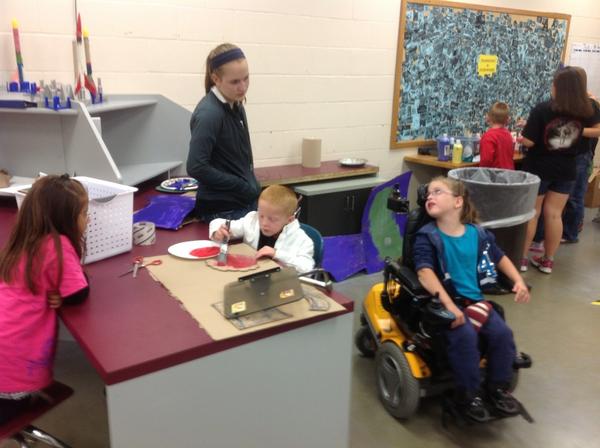
Teamwork as the Kindergarten and 7th Graders work together to create there cardboard challenge.
Educating young minds was something that came naturally to me. Every moment in our lives has been a teachable moment and every story read a springboard to new height. I had to become a teacher! This has lead into the passion for educating staff and students in technology.
 We are all one click away from being pulled into an information portal, filled with erroneous, distracting and at times dangerous material. We are also one click away from making a mistakenly sharing information not intended for a wider audience, in the form of an email, a wall post, text or chat message. We've all heard the admonition "think before you post." The new mantra should be "think before you click." It's hard to stay true to this statement in practice, especially as we endure a fast-paced, real-time information onslaught.


.JPG)
+copy.JPG)
.jpg)


.JPG)
.JPG)


.JPG) T
T.JPG)


.JPG)








 Posts
Posts


