Many of the Howard-Winneshiek Staff were inspired with the story of Caine’s Arcade blasted into the mainstream. If you haven’t watched the original, stop reading this and go watch it!
To celebrate the one year anniversary of the flash mob they hosted for Caine, they are organizing a Global Cardboard Challenge. Hundreds of people are hosting play parties where kids can get together and MAKE with cardboard. It’s about creativity, fun and more than anything, play.
Take a look at the followup video to Caine’s Arcade.
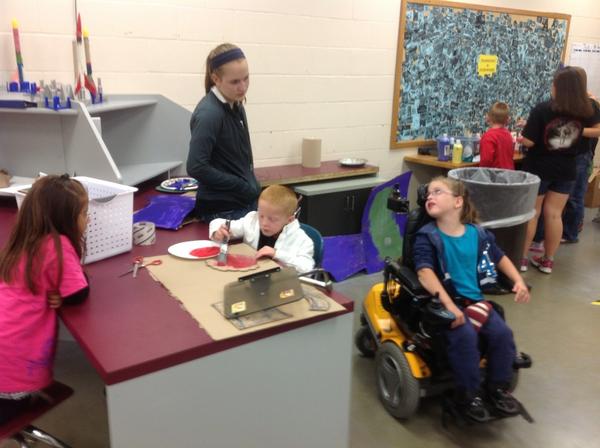
Just as Caine's story has been an inspiration to our staff and students they have been creating there Cardboard project.
Cardboard Pile
Take a look at their before projects: As the projects are underway here is the pile of Cardboard the students used to create there imagination projects.
Teamwork as the Kindergarten and 7th Graders work together to create there cardboard challenge.
When I mention Dropbox to friends and colleagues, I usually get one of two responses – a knowing smile and nod, or a puzzled and quizzical look. Whether you know what the program is, you have likely heard the name. But really, what is Dropbox?
Dropbox is many things — a tool that’s so powerful, you’ll continue to discover new ways to use it. You can use it to store and sync documents and files across computers, tablets, and smart phones. I can write a lesson plan on my computer at home, put it in my Dropbox folder, and whoosh – it’s synced with my school computer. During a free period at school, I can open that file, make a few changes, and the changes are automatically synced with my home computer. It’s seamless, fast and free.
How Dropbox works
So, how can you use Dropbox as an educator? There are many ways that you can do this. One is to just manage your own material and make it more accessible. Additionally, many applications that you likely use (Evernote, iPad camera roll,iPhoto to name a few) have a Dropbox sync option. Check your favorite applications to see if they have a “save to Dropbox” feature. Since Dropbox works across platforms and devices, you can use a Mac at home, a Blackberry phone and an iPad, and you will have access to your documents on *all* of them. Thanks to Dropbox’s syncing magic, your documents will be up to date at all times on all devices.
Using Dropbox with students
In addition to making your life a lot easier, Dropbox can be a great teaching/learning tool – and this is why its introduced to staff and students. The first thing to do is to create a sharing folder for each class you teach so you can make information available to your students (PowerPoints, hand-outs, reading assignments, whatever).
You can call this folder anything. For mine Tech Time, consider adding the word “share” and create folders with names like “Tech Time Share Folder.” When you go to your Dropbox page on the web, this screenshot gives you some idea of what you will see.
Next Step: Put your mouse over the folder and right-click on the folder - a drop down menu will appear. Select "Invite to Folder."
Next, you will get the window shown below. Input the email address of your students/staff (this will also invite them to join Dropbox, giving you and them the free 250 MB). You can also input a message like: "Accept this invitation to have access to our material for class."
Once you have invited students this becomes a "Shared Folder." Whoever has access to this folder (everyone who has been invited an accepted the invitation) can add files, download content, and (whether you like it or not) delete content. However, only *you* (as the owner of the folder) can delete or edit out content permanently. Click on the folder in Dropbox and then on "Show Deleted Files."
How do I employ Dropbox in my classroom?
Dropbox can be used in a number of ways. Here are several:
To store additional copies of hand-outs. Students know to re-download and print on their own here if they missed a hand-out due to an absence or simply lost it.
To distribute PowerPoint presentations – if they are too large for email or edmodo.
As a way for students to turn in homework assignments. It’s an easy electronic homework drop and will time stamp submissions.
Dropbox can also be a useful tool in managing student projects and presentations. With Dropbox, you can visually determine that students have completed a particular portion of a project or presentation assignment. Best of all, since all presentations are “turned in” to same virtual place, every student can access his or her presentation by one log-in.
Students catch on quickly
They can store homework assignments there for easy access, pictures, and videos. Students can use Dropbox on their phones to review handouts (rather than a print-out, ultimately saving paper). And many of them can sync their files across multiple computers outside of school.
This isn’t a program you will have to teach your students to use. Don’t be surprised if in a few weeks, they’re showing you some tricks you haven’t even considered. That’s something I would encourage.
October is National Bullying Prevention Awareness Month. To signify its importance, STOMP out Bullying created BLUE SHIRT DAY. Specifically the first Monday of every October, kids, teens and adults are asked to participate in BLUE SHIRT DAY by wearing a blue shirt to create awareness to STOMP Out Bullying. GO BLUE and wear a Blue Shirt this Monday, October 1st. Together we can create awareness and STOMP Out Bullying. Let’s make October 1st the day that bullying and cyberbullying prevention are heard all over the Howard-Winneshiek Community School District.
Being bullied is never easy, and can make a child feel very powerless, alone, isolated, and fearful. The following are ten things your child can do to stop a bully. These tactics works for adults as well as children. No matter what the bullying situation, it is possible to stop a bully by trying the following ten tactics.
1. Learn to look or act indifferent. A lot of bullying comes as a result of the reactions you give bullies when they push your buttons. If they find that they can elicit a response from you, they will continue to bully you. So, learn to keep your emotions off your face, so that they give up and move on.
2. Ignore the bully if you can. Bullies usually taunt first, and bully second. So, ignore them if you can. If they instant message you, don’t respond. If they yell your name at school, just keep walking. If they come up to you in a classroom, just look the other way. Ignore, ignore, ignore. Bullies feed off of attention.
3. Stand up to them. This does not mean bully back, it just means that you shouldn’t put up with it. Let them know that you will tell on them, that you aren’t going to just take it, and that you aren’t afraid to get them in trouble. Usually bullies pick on kids who are too weak or too frightened to ever get them in trouble.
4. Avoid the bully. Sometimes bullies will bully out of opportunity more than anything else. So, avoid places, situations, times, and people that may lead to you being bullied. For example, don’t wander clear out by the fence during recess because a bully will have ample time to bully you without a playground monitor catching them.
5. Tell someone. There is a difference between tattling and telling. If you just tell to get them in trouble you are a tattle, but if you tell because they pose a danger to you or your friends, tell on them.
6. Be brave. You can’t show a bully that you are afraid of them, or the bullying will get worse. If you fear standing up to them, fear telling on them, and fear interaction with them, and let them know it, you empower them. So, instead, work on that mask of indifference, and avoid them when possible.
7. Work the buddy system. Bullies tend to single out kids who are already singled out, who are alone. It is far easier for one kid to pick on one kid, than one kid to pick on two. So, have a buddy when you are in situations where you might run into the bully.
8. Build self-esteem. Bullies can sense when someone has low esteem, and they prey on that. It is like they figure out what you are most afraid of, and self conscious of, and that is what they target.
9. Confront them. It is important that if the bully you, you call them out on it. Ask them what their problem is, why they are picking on you, and make sure they know you are the victim. Sometimes recognizing that they are making someone a victim will give them a wakeup call, and get them to stop.
10. Report it every time. If it happens at school, tell the teacher, lunch lady, hall monitor, or whomever you need to to make sure it gets stopped. If it happens enough times, is reported often enough, etc. it will eventually stop.
Its been a great week at Howard-Winneshiek CSD with our 1:1 iPads in the Junior High. The students are actively making choices about how to generate, obtain, manipulate, or display information. Technology use allows many more students to be actively thinking about information, making choices, and executing skills than is typical in teacher-led lessons.
Students are learning on the go all the time with these devices in their hand. Just take a look around the community and where are the Junior High students hanging out? I have noticed groups hanging out at the local library, arriving before school or even staying after school later to all use the WI-FI access. But the BIG question to ask our selves is what will we do to help rural students in our district who live on a farm to receive WI-FI access?
The teachers are also learning how to support students in performing authentic tasks. They have been working collaboratively with one another as a team to learn new steps, processes, and Apps for the classroom. This has been a learning curve but they all have been eager to learn new technology and utilize it on a daily basis. When meeting with the staff they were overcoming how students should submit an assignment from their iPad. That evening I received a video that a teacher created from the Show Me App explaining to the students how to submit their homework. It's these types of challenges the staff is coming together to find solutions and how to solve the problem. As Superintendent Carver wrote the staff "there will be Opportunities and Challenges and I am confident we are ready for what's next"!
Educating young minds was something that came naturally to me. Every moment in our lives has been a teachable moment and every story read a springboard to new height. I had to become a teacher! This has lead into the passion for educating staff and students in technology.





 Posts
Posts


